Перейти к основному содержанию
Присоединяйся к сообществу ремонтников - Создай аккаунт

Sony WH-1000XM4 Battery Replacement

Выберете то, что вам нужно

    1. Sony WH-1000XM4 Battery Replacement, Place the headphones speakers-up: шаг 1, изображение 1 из 1
      • Before beginning any repairs, press and hold the power button on the left ear cup for about 2 seconds until the blue light turns off.

      • Place your headphones onto a work surface, ear pads facing up.

      Спросите у FixBot

      Добавить комментарий

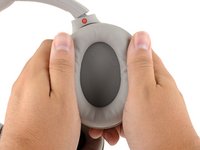
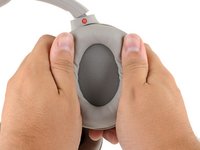
    1. Sony WH-1000XM4 Battery Replacement, Create a gap: шаг 2, изображение 1 из 2 Sony WH-1000XM4 Battery Replacement, Create a gap: шаг 2, изображение 2 из 2
      • Use your thumb to depress the RIGHT ear pad near the long outer edge, creating a gap between the cushion and the frame.

      Спросите у FixBot

      Добавить комментарий

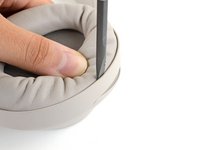
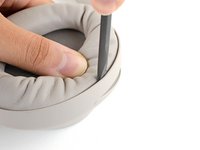
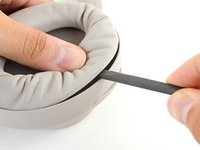
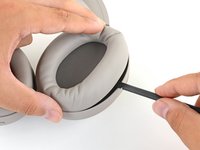
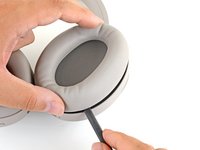
    2. Sony WH-1000XM4 Battery Replacement, Unclip the ear cup: шаг 3, изображение 1 из 3 Sony WH-1000XM4 Battery Replacement, Unclip the ear cup: шаг 3, изображение 2 из 3 Sony WH-1000XM4 Battery Replacement, Unclip the ear cup: шаг 3, изображение 3 из 3
      • Insert the flat end of a spudger into the gap you've created, between the edge of the cushion and the frame.

      • Pivot the spudger down to unclip the long edge of the ear pad.

      • When the first clip disconnects, you'll hear an audible clicking sound.

      • This may take a considerable amount of force. If the cushion won't click out of place, move your spudger to different points along the long edge.

      Спросите у FixBot

      Добавить комментарий

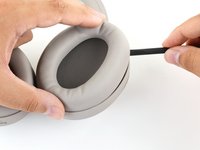
    3. Sony WH-1000XM4 Battery Replacement: шаг 4, изображение 1 из 3 Sony WH-1000XM4 Battery Replacement: шаг 4, изображение 2 из 3 Sony WH-1000XM4 Battery Replacement: шаг 4, изображение 3 из 3
      • Repeat the previous step around the perimeter of the ear cup to disconnect the remaining clips.

      Спросите у FixBot

      Добавить комментарий

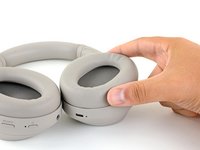
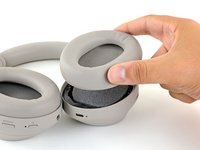
    4. Sony WH-1000XM4 Battery Replacement, Remove the ear pad: шаг 5, изображение 1 из 2 Sony WH-1000XM4 Battery Replacement, Remove the ear pad: шаг 5, изображение 2 из 2
      • Remove the right ear pad.

      Спросите у FixBot

      Добавить комментарий

    5. Sony WH-1000XM4 Battery Replacement, Reassembly tip: шаг 6, изображение 1 из 2 Sony WH-1000XM4 Battery Replacement, Reassembly tip: шаг 6, изображение 2 из 2
      • When installing a replacement right ear pad:

      • Align the cushion over the speaker and press them firmly together to snap it into place.

      • Press around the entire edge of the cushion, making sure all the clips have engaged.

      Спросите у FixBot

      Добавить комментарий

    1. Sony WH-1000XM4 Battery Replacement, Remove the foam liner: шаг 7, изображение 1 из 1
      • Remove the foam liner from the right ear cup's speaker.

      Спросите у FixBot

      Добавить комментарий

    2. Sony WH-1000XM4 Battery Replacement, Remove the ear cup cover screws: шаг 8, изображение 1 из 1
      • Use a Phillips screwdriver to remove the four 8.4 mm screws securing the right ear cup cover.

      Спросите у FixBot

      Добавить комментарий

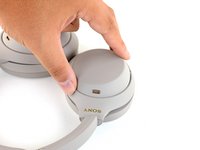
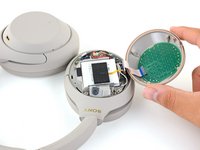
    3. Sony WH-1000XM4 Battery Replacement, Flip out the cover: шаг 9, изображение 1 из 2 Sony WH-1000XM4 Battery Replacement, Flip out the cover: шаг 9, изображение 2 из 2
      • Flip the headphones over, ear cups facing down.

      • Use your fingers to lift up and flip over the right ear cup cover.

      • Don't try to completely remove the cover just yet—it's still attached with the touch cable.

      Спросите у FixBot

      Добавить комментарий

    4. Sony WH-1000XM4 Battery Replacement, Remove the right ear cup cover: шаг 10, изображение 1 из 2 Sony WH-1000XM4 Battery Replacement, Remove the right ear cup cover: шаг 10, изображение 2 из 2
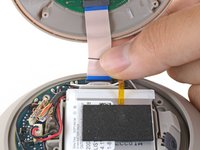
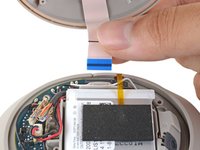
      • Grip the touch ribbon cable and pull it straight out of its connector on the main board to remove it.

      • Remove the ear cup cover.

      Спросите у FixBot

      Добавить комментарий

    5. Sony WH-1000XM4 Battery Replacement, Disconnect the battery: шаг 11, изображение 1 из 2 Sony WH-1000XM4 Battery Replacement, Disconnect the battery: шаг 11, изображение 2 из 2
      Инструмент, используемый на этом этапе:
      Tweezers
      $4.99
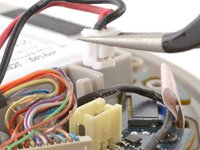
      • Warning: Over time, this connector can become brittle. Go slowly, and try to hold the off-white connector to the board as you work. Don't use excessive force, or you risk pulling the connector off of the board and breaking the fragile solder joints.

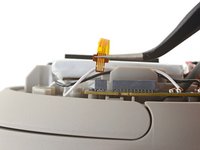
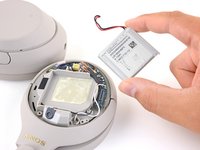
      • Use a pair of tweezers to grip the edges of the battery connector, and pull up to disconnect it from the main board. If necessary, lever the connector out, or "walk" the tweezer arms side-to-side to release the connector from its socket.

      • Always pull cables by their connectors and not the wires themselves.

      Спросите у FixBot

      Добавить комментарий

    6. Sony WH-1000XM4 Battery Replacement, Remove the thermal sensor: шаг 12, изображение 1 из 3 Sony WH-1000XM4 Battery Replacement, Remove the thermal sensor: шаг 12, изображение 2 из 3 Sony WH-1000XM4 Battery Replacement, Remove the thermal sensor: шаг 12, изображение 3 из 3
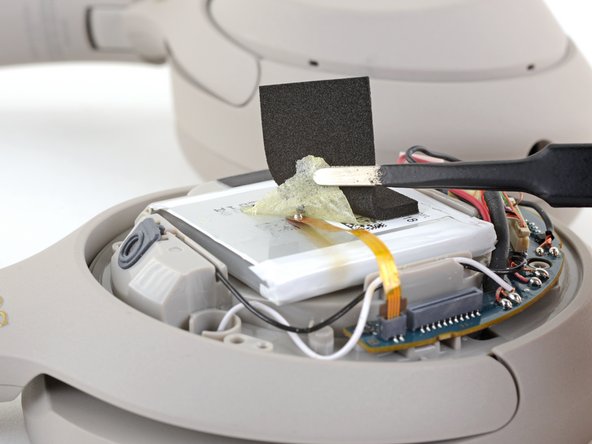
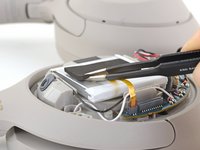
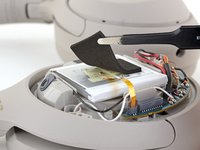
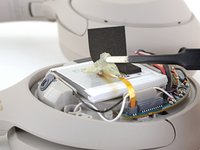
      • If your replacement battery doesn't come with a thermal sensor preinstalled, you'll need to transfer your old one over from your old battery.

      • Whenever you use tweezers near the battery, be very careful not to puncture the battery.

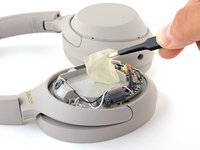
      • Use a pair of tweezers to peel back the foam and adhesive covering the battery thermal sensor.

      • During reinstallation, make sure the diode on the end of the thermal sensor flex cable is facing up.

      Спросите у FixBot

      Добавить комментарий

    7. Sony WH-1000XM4 Battery Replacement: шаг 13, изображение 1 из 2 Sony WH-1000XM4 Battery Replacement: шаг 13, изображение 2 из 2
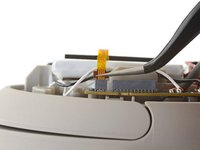
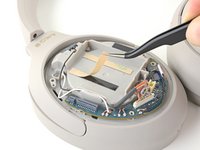
      • Use a pair of tweezers to pull up on the thermal sensor ribbon cable to disconnect it from the main board.

      • Pull only on the darker pull-tab section of the cable, not the cable itself.

      • Remove the thermal sensor.

      Спросите у FixBot

      Добавить комментарий

    8. Sony WH-1000XM4 Battery Replacement, Pry up the battery: шаг 14, изображение 1 из 3 Sony WH-1000XM4 Battery Replacement, Pry up the battery: шаг 14, изображение 2 из 3 Sony WH-1000XM4 Battery Replacement, Pry up the battery: шаг 14, изображение 3 из 3
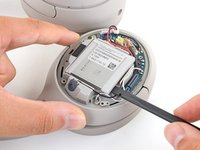
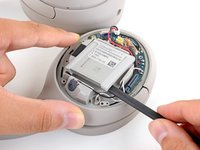
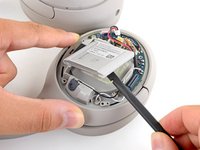
      • Slide the flat end of a spudger under the top-lefthand corner of the battery.

      • Push the spudger underneath the battery, prying up intermittently to work the battery away from its adhesive.

      Спросите у FixBot

      Добавить комментарий

    9. Sony WH-1000XM4 Battery Replacement, Remove the battery: шаг 15, изображение 1 из 3 Sony WH-1000XM4 Battery Replacement, Remove the battery: шаг 15, изображение 2 из 3 Sony WH-1000XM4 Battery Replacement, Remove the battery: шаг 15, изображение 3 из 3
      Инструмент, используемый на этом этапе:
      Tesa 61395 Tape
      $8.95
      • Remove the battery.

      • Don't reuse the battery after it has been removed, as doing so is a potential safety hazard. Replace it with a new battery.

      • To install a new battery:

      • Remove any remaining adhesive from the battery well.

      • If your replacement battery does not come with replacement adhesive, lay some double-sided tape or pre-cut adhesive strips in the headphone's battery well.

      • Peel away any tape liners to expose the adhesive.

      • Lay the battery on the adhesive and press firmly.

      Спросите у FixBot

      Добавить комментарий

Заключение

Compare your new replacement part to the original part—you may need to transfer remaining components or remove adhesive backings from the new part before installing.

To reassemble your device, follow the above steps in reverse order.

Take your e-waste to an R2 or e-Stewards certified recycler.

Repair didn’t go as planned? Try some basic troubleshooting or search our Answers community for help.

Отменить: Я не выполнил это руководство.

50 человек успешно провели ремонт по этому руководству.

Carsten Frauenheim

Участник с: 03/10/20

168 330 Репутация

Автор 438 руководств

Команда

iFixit Участник iFixit

Staff

123 членов

Автор 59 471 руководств

14 Комментарии к руководству

You can also get the battery from sony’s site!

https://sony.encompass.com/item/11687300...

Will - Ответить Поделиться

Is this a xm3 or an xm4 battery?

David Kobura Sandberg - Ответить Поделиться
In reply to the previous comment, that is NOT “sony’s site”. Encompass is not Sony! They distribute parts for hundreds of different brands, not just Sony. I’m not saying there’s anything wrong with them but don’t mislead people into thinking they’re buying directly from Sony!

Haitham - Ответить Поделиться

Thanks for this guide. I was able to repair a loose cable on my XM3s with this disassembly information.

Since the design of the models are mostly the same it would be nice to have a similar disassembly guide on the XM3 website too.

X West - Ответить Поделиться

como puedo adquirir la batería con el sensor térmico preinstalado de los audífonos sony wh1000xm4 ????? avisarme a josephchr_est@hotmail.com

Dental Service - Ответить Поделиться

Добавить комментарий

Статистика просмотров:

За последние 24 часов: 105

За последние 7 дней: 703

За последние 30 дней: 2,870

За всё время: 230,723