Перейти к основному содержанию
Присоединяйся к сообществу ремонтников - Создай аккаунт

MacBook Pro 16" 2021 Lower Case Replacement

Выберете то, что вам нужно

  1. MacBook Pro 16" 2021 Lower Case Replacement, Unfasten the lower case: шаг 1, изображение 1 из 2 MacBook Pro 16" 2021 Lower Case Replacement, Unfasten the lower case: шаг 1, изображение 2 из 2
    Инструмент, используемый на этом этапе:
    Magnetic Project Mat
    $19.95
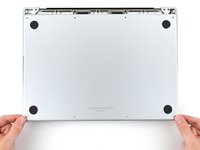
    • Completely power off and unplug your MacBook Pro before you start. Close the display and flip the entire laptop upside-down.

    • Use a P5 Pentalobe driver to remove eight screws securing the lower case:

    • Four 9.1 mm screws

    • Four 5 mm screws

    • Throughout this repair, keep track of each screw and make sure it goes back exactly where it came from to avoid damaging your device.

    Спросите у FixBot

    Добавить комментарий

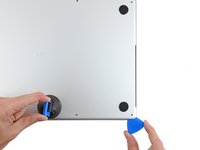
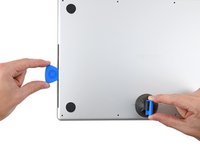
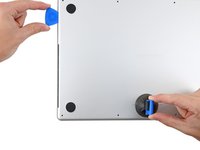
  2. MacBook Pro 16" 2021 Lower Case Replacement, Unclip the lower case: шаг 2, изображение 1 из 2 MacBook Pro 16" 2021 Lower Case Replacement, Unclip the lower case: шаг 2, изображение 2 из 2
    • Press a suction handle into place near the front edge of the lower case, between the screw holes.

    • Pull up on the suction handle to create a small gap under the lower case.

    Спросите у FixBot

    Добавить комментарий

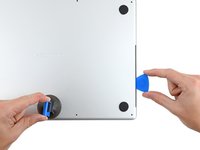
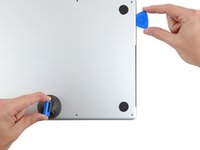
  3. MacBook Pro 16" 2021 Lower Case Replacement, Release the rear cover's right clips: шаг 3, изображение 1 из 3 MacBook Pro 16" 2021 Lower Case Replacement, Release the rear cover's right clips: шаг 3, изображение 2 из 3 MacBook Pro 16" 2021 Lower Case Replacement, Release the rear cover's right clips: шаг 3, изображение 3 из 3
    • Insert an opening pick into the gap you just created.

    • Slide the opening pick around the nearest corner and then halfway up the side of the MacBook Pro.

    • This releases the first of the hidden clips securing the lower case. You should feel and hear the clip pop free.

    Спросите у FixBot

    Добавить комментарий

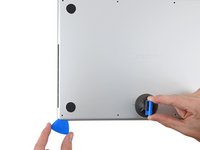
  4. MacBook Pro 16" 2021 Lower Case Replacement, Release the rear cover's left clips: шаг 4, изображение 1 из 3 MacBook Pro 16" 2021 Lower Case Replacement, Release the rear cover's left clips: шаг 4, изображение 2 из 3 MacBook Pro 16" 2021 Lower Case Replacement, Release the rear cover's left clips: шаг 4, изображение 3 из 3
    • Repeat the previous step on the other side, using an opening pick to to release the second clip.

    Спросите у FixBot

    Добавить комментарий

  5. MacBook Pro 16" 2021 Lower Case Replacement: шаг 5, изображение 1 из 3 MacBook Pro 16" 2021 Lower Case Replacement: шаг 5, изображение 2 из 3 MacBook Pro 16" 2021 Lower Case Replacement: шаг 5, изображение 3 из 3
    • Pull firmly to slide the lower case towards the front edge of the MacBook (away from the hinge area) to separate the last of the clips securing the lower case.

    • Pull first at one corner, then the other.

    • Pull to the side—not up.

    • This may require a lot of force.

    Спросите у FixBot

    Добавить комментарий

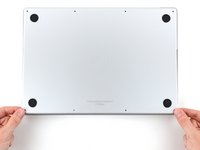
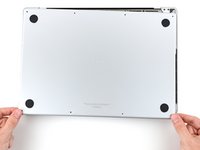
  6. MacBook Pro 16" 2021 Lower Case Replacement, Remove the lower case: шаг 6, изображение 1 из 3 MacBook Pro 16" 2021 Lower Case Replacement, Remove the lower case: шаг 6, изображение 2 из 3 MacBook Pro 16" 2021 Lower Case Replacement, Remove the lower case: шаг 6, изображение 3 из 3
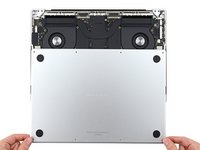
    • Remove the lower case.

    • To reinstall the lower case:

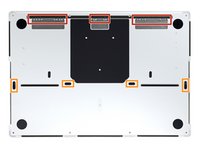
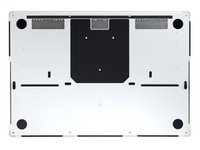
    • Set it in place and align the sliding clips near the display hinge. Press down and slide the cover toward the hinge. It should stop sliding as the clips engage.

    • When the sliding clips are fully engaged and the lower case looks correctly aligned, press down firmly on the lower case to engage the four hidden clips underneath. You should feel and hear them snap into place.

    Спросите у FixBot

    Добавить комментарий

Заключение

To reassemble your device, follow these instructions in reverse order.

Compare your new replacement part to the original part—you may need to transfer remaining components or remove adhesive backings from the new part before you install it.

Repair didn’t go as planned? Try some basic troubleshooting, or ask our MacBook Pro 16" 2021 Answers community for help.


Отменить: Я не выполнил это руководство.

6 человек успешно провели ремонт по этому руководству.

Alex Diaz-Kokaisl

Участник с: 01/16/22

238 872 Репутация

Автор 1 171 руководств

Команда

iFixit Участник iFixit

Staff

122 членов

Автор 25 936 руководств

1 Комментарий к руководству

Thank you for this guide. It is incredibly easy to understand and follow.

Ruslan Kurchenko - Ответить Поделиться

Добавить комментарий

Статистика просмотров:

За последние 24 часов: 15

За последние 7 дней: 101

За последние 30 дней: 433

За всё время: 18,240